
To change your subscription plan in FoodDocs, go to Billing > MANAGE SUBSCRIPTION on a desktop, click Update plan, select your billing cycle, and confirm. Subscription changes can only be made on a desktop — the option is not available in the mobile app.
There are three subscription plans in FoodDocs:
For the latest plan names, billing options, and included features, see the FoodDocs pricing page.
Please note:
- The cost of the new subscription will be recalculated automatically; the initial payment will be considered.
- This feature is available ONLY on a desktop. It means you cannot upgrade your subscription in your app.
- Log in to your account on your computer.
- Go to Billing > MANAGE SUBSCRIPTION.
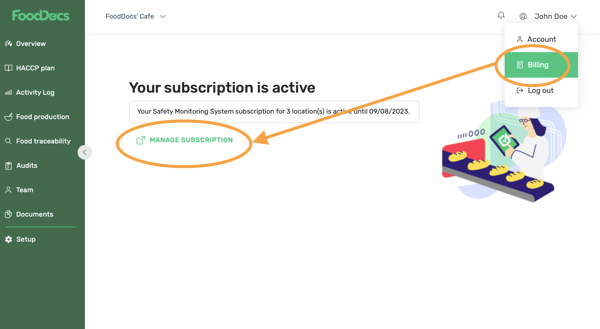
- Click the Update plan button.
- Select Monthly or Yearly, then click Continue.
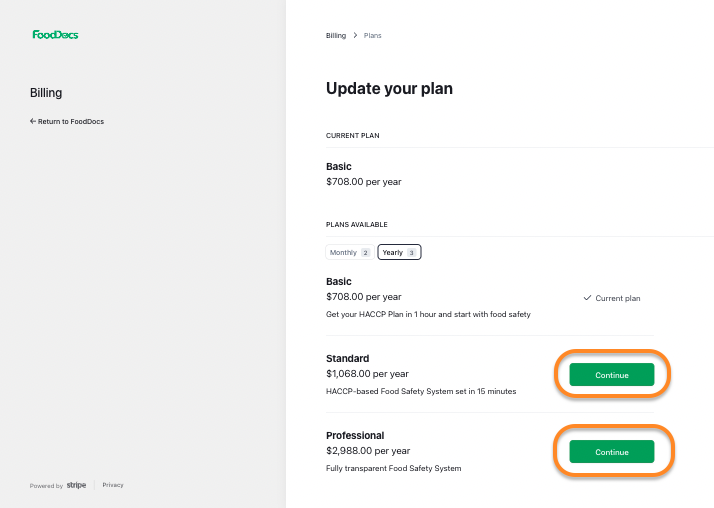
- Select the plan you want to switch to (Basic, Standard, or Professional) and click Continue.
- Review your payment details and click Confirm.
For further assistance, contact the support team via the Live chat button or email support@fooddocs.com.