
Released: 02 October 2026
What is it?
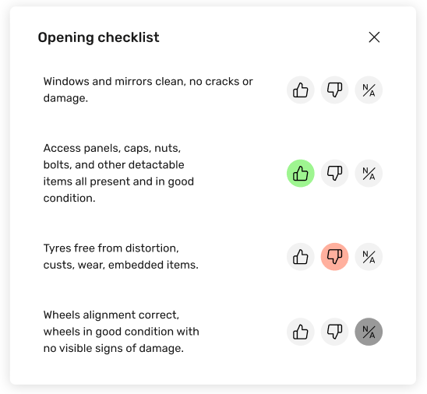
Track task completion with the new Yes/No/NA field in Monitoring.
Why does it matter?
Easily mark each task as:
- Yes — Done
- No — Not done
- NA — Not applicable
See what’s complete, what still needs attention, and what doesn’t apply.
Key benefits:
- Quick and easy to complete
Record answers with a simple tap in the mobile app. - Clear overview of task completion
See what’s done and spot missed checks and deviations, grouped by location.
How does it work?
Setup
-
Go to Monitoring > Settings > Monitoring tasks
-
Create a new detailed task
- Assign the task and set the task frequency
-
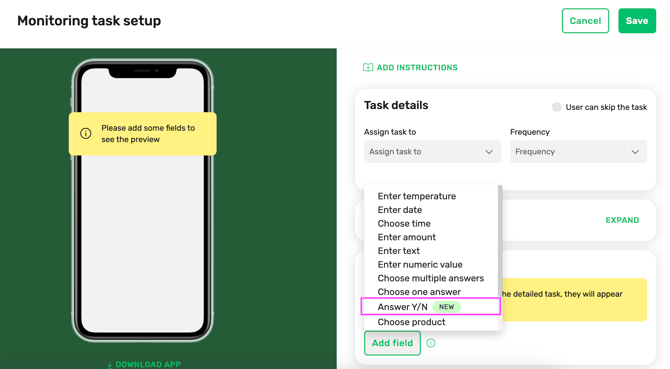
Start adding task fields
-
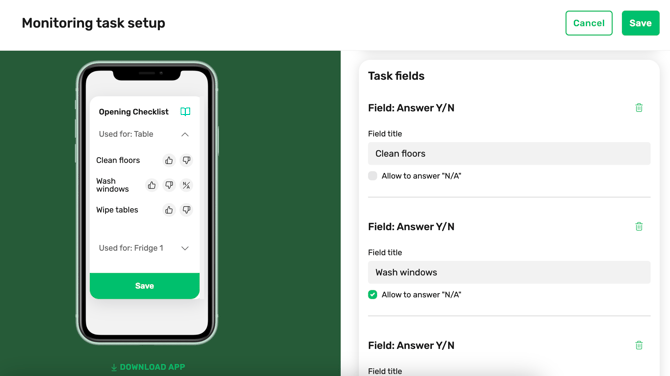
Add field "Answer Y/N", check "Allow to answer "N/A" in case it's allowed
-
Save task
- Open it in the mobile app and start filling
Who gets it?
Any FoodDocs user with a valid subscription or trial package.