
If you produce multiple products, you will need to create product-specific HACCP plans, or in other words, Hazard Analysis, CCP list, and Flow Chart per each product you make and sell.
How to add a product-specific HACCP plan:
- Log into your FoodDocs account.
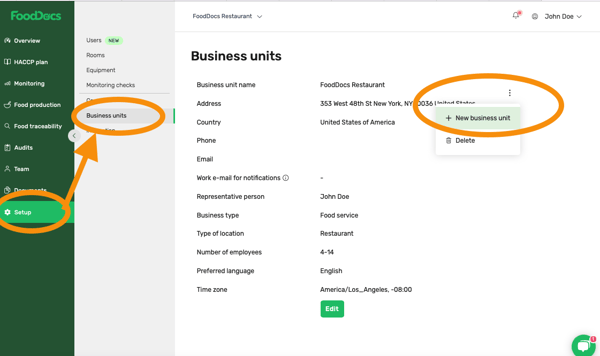
- Go to the Setup.
- Click on Business units.
- Click on three grey dots and select +New business unit.
- Pop up window with Changes to your subscription will come up.
Please note: if you have an active subscription, your card will be charged for the added unit automatically.
- Click Continue.
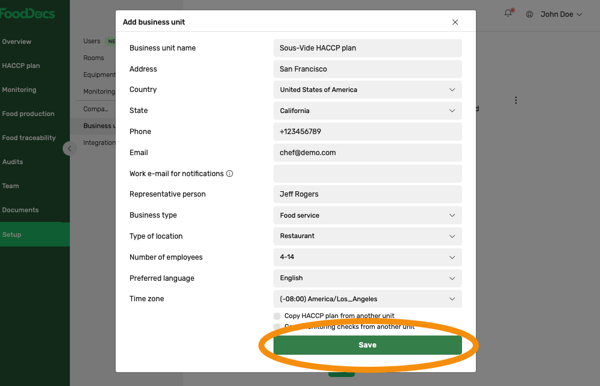
- Fill in the required fields and click Save.
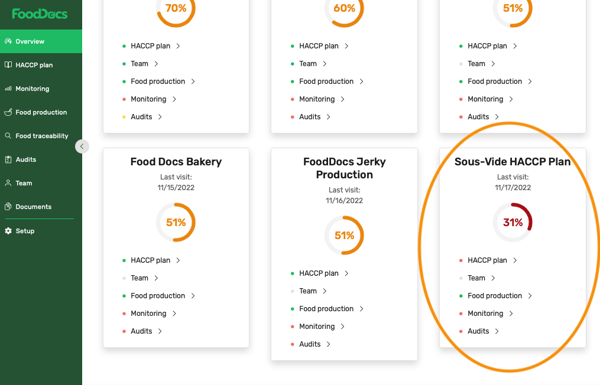
- In the Overview, you now have a new unit to make the product-specific HACCP plan.
Something we haven't covered?
Feel free to reach out via Live chat button or email to support@fooddocs.com