
Follow these steps to edit your first product group/line:
- Go to HACCP Plan - > Manage
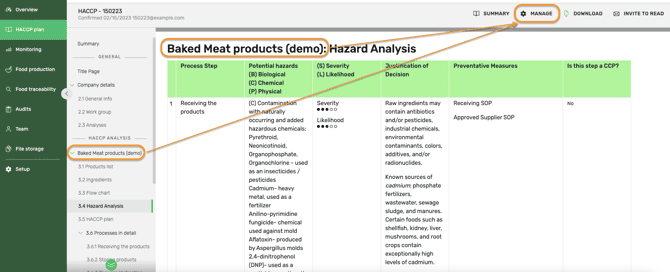
- Go to Product group/line chapter
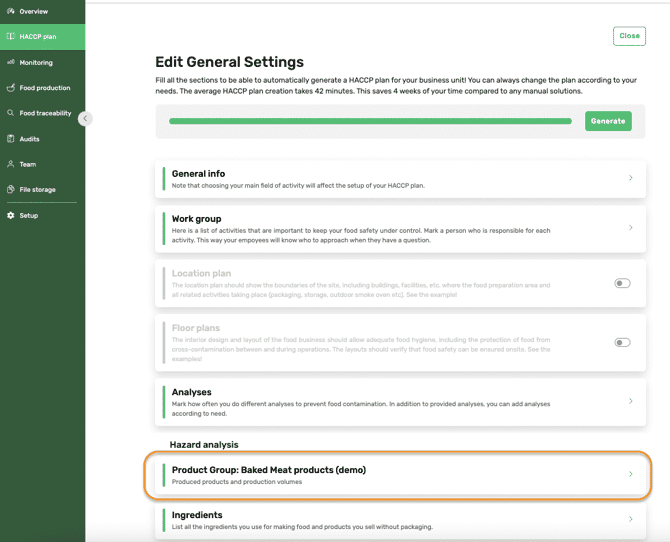
-
- Edit Product group/line name (e.g Sausages)
- Edit existing Product list - edit product name, category, volume, unit, and frequency
The product category is the field, which will define hazards in the HACCP plan. Try to find the most suitable one to get an accurate hazard analysis.
-
- Add product - add into the product group/line all similar processing method products (e.g, frankfurter sausace, chilli sausage etc).
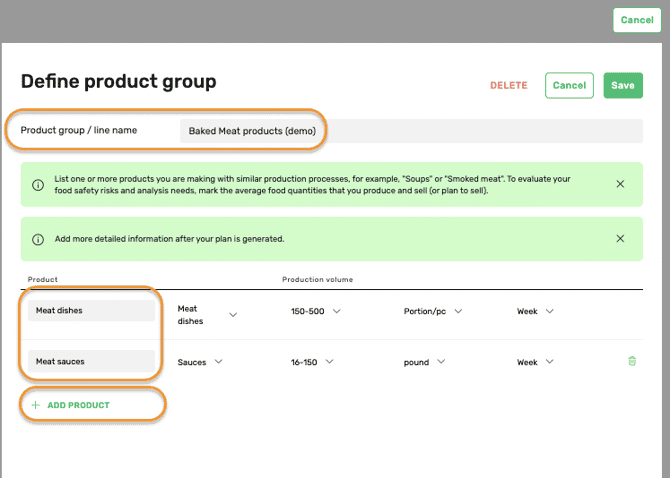
- When everything is completed, click SAVE.
NB! Do not forget to customize also ingredients, process steps, and flow chart based on new product groups/lines.
Follow these steps to add new product group/line.
Something we haven't covered?
Feel free to reach out via the Live chat button or email support@fooddocs.com